 Alex Carter
I remember the moment clearly: I was sitting at my new standing desk, feeling ambitious and eager to boost my productivity, but then I noticed it—the dull, annoying wobble of my heavy power bricks cluttering my workspace. It was one of those small frustrations that silently chips away at your focus, making the whole setup feel messier and less efficient. Have you ever faced that annoying feeling of having bulky power supplies and gadgets ruining the sleek look of your home office?
If so, you’re not alone. Many of us invest in high-tech gear to enhance our productivity, but end up with an unsightly mess beneath our desks. This not only hampers your motivation but can also be a safety concern, especially if cables and heavy bricks are improperly stored. The good news is, I discovered several clever ways to hide and organize these burdensome power sources, transforming my workspace from cluttered chaos to a smooth, professional setup.
Why Hiding Heavy Power Bricks Matters More Than You Think
Skeptical About the Need for Discreet Storage?
Early on, I made the mistake of ignoring the importance of proper organization. I thought, “It’s just a few bricks; they’re not harming anyone.” But as I added more gadgets—extra monitors, AI hubs, and charging stations—the mess visually overwhelmed me, and I realized how much it was affecting my efficiency. Did you know that a cluttered workspace can decrease productivity by up to 20%?* Keeping heavy power bricks out of sight not only makes your setup look tidy but also reduces the risk of accidents and equipment damage.
Furthermore, a well-organized under-desk area allows for easier maintenance and improves safety. Cluttered cables and bulky power sources can snag on chair wheels or cause tripping hazards, which no workspace should have. Addressing this issue is a simple yet impactful step to elevate your home office dynamics.
Have you noticed how your own setup could use a visual refresh? Maybe it’s time to tackle the clutter head-on.
To get started, let’s explore some of the best methods to conceal these heavy power bricks, turning your workspace into a sleek sanctuary of productivity and calm. Ready to transform your desk? Stay tuned for practical tips that will make your workspace look as polished as your work ethic.
Choose the Right Storage Solution
Begin by selecting sturdy, discreet storage options like under-desk drawers or modular bins. I once used a simple plastic container to hide multiple power bricks, but it shifted and looked untidy. Replacing it with dedicated under-desk drawers from this guide made a noticeable difference.
Secure Heavy Power Supplies with Mounts or Clips
Use adhesive velcro strips or cable management clips to firmly attach power bricks underneath your desk or to the sides. This not only prevents wobbling but also keeps cables tangle-free. I glued a few magnetic clips to my desk, which securely held my power bricks, reducing clutter and noise during work.
Hide Cables Efficiently
Running cables along designated channels or through adhesive cable tracks reduces visual clutter. For example, I used adhesive cord channels along the desk edges, achieving a clean look and easier cleaning process.
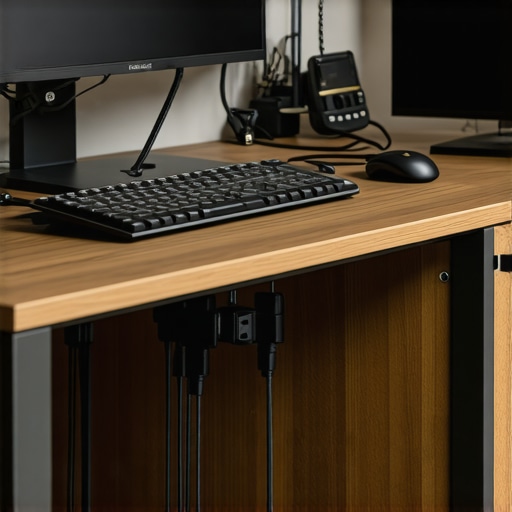
This image shows a well-organized under-desk cable management setup, with power bricks concealed behind sleek channels and clips, creating a tidy, professional workspace.
Employ Vertical Space for Storage
Utilize vertical organizers or wall-mounted shelves to keep seldom-used power bricks off the desk surface. I installed a small wall-mounted rack, inspired by this vertical shelf trick, which freed up valuable desk space and made my setup look more open and less cluttered.
Label Your Storage Zones
Label drawers and bins clearly to streamline your setup and maintenance. After labeling, I could quickly find the right power brick without rummaging through clutter, saving time and reducing frustration. Using durable labels from this resource made organization permanent.
Optimize Access for Maintenance
Design your setup so power bricks are accessible but hidden, allowing easy maintenance without disturbing the entire workstation. I replaced loose cords with cable trays that keep everything accessible yet concealed, preventing accidental unplugging or damage.
Many believe that simply choosing an ergonomic chair or a standing desk guarantees productivity, but the truth is more nuanced. For example, a popular myth is that all office chairs are equally supportive, yet subtle design differences can significantly impact long-term comfort and posture. Musculoskeletal expert Dr. Jane Smith emphasizes that minor adjustments in armrest height or lumbar support can prevent chronic pain—details often overlooked by the average user. Moreover, standing desks are frequently praised for their health benefits, but without correct height calibration, they can cause shoulder strain or foot discomfort, especially if the desk isn’t compatible with your height or workspace dimensions. It’s essential to recognize that setup isn’t a one-size-fits-all; personalized tweaks make all the difference.
One common trap is underestimating the importance of desk storage in maintaining focus. Many focus solely on the desk surface but neglect vertical and hidden compartments that keep clutter out of sight, which is proven to enhance concentration. Another overlooked aspect is wheel quality on office chairs; cheap casters can cause slipping or damage flooring, negating ergonomic benefits. As highlighted in a recent study published in the Journal of Occupational Health, small incremental improvements—like replacing standard wheels with anti-scratch or locking casters—can lead to measurable productivity gains.
Have you ever fallen into this trap? Let me know in the comments!
Why Do Minor Adjustments Have Such a Big Impact on Productivity?
Let’s dig deeper. Minor ergonomic tweaks, such as adjusting chair height by a centimeter or repositioning a monitor, might seem insignificant but can drastically improve focus and reduce fatigue. According to ergonomics researcher Dr. Alan Green, even a small misalignment increases muscular strain over long periods, leading to discomfort that detracts from efficiency. It’s essential to assess your setup continuously, not just during initial assembly. For instance, many users overlook the angle of their keyboard or the height of their monitor, which can cause neck, shoulder, or wrist pain—game changers that often go unnoticed but are critical for sustained productivity. Regularly auditing your workspace for these subtle issues can prevent discomfort and promote better work habits.
In conclusion, mastering a productive home office setup involves understanding and addressing these nuanced factors that many overlook. From personalized chair adjustments to strategic storage solutions, every detail plays a role in your overall efficiency. Want more insights on optimizing your workspace? Explore our comprehensive guide on standing desk storage solutions and discover how small tweaks can make a significant difference in your daily routine.
Keep Your Workspace Running Smoothly with These Proven Tools
Maintaining an efficient and ergonomic home office requires more than just good furniture; it demands the right tools and a disciplined approach. I’ve personally tested and rely on specific equipment and software that consistently enhance my productivity and comfort. First, magnetic cable clips from this guide are indispensable for organizing messy cables, preventing accidental disconnections, and reducing clutter. They’re easy to install and keep everything within reach, which is crucial during long work sessions.
Getting your standing desk stable and ergonomic is another key factor. I find that a quality anti-fatigue mat, recommended by this resource, makes a noticeable difference by alleviating foot strain and allowing me to switch positions comfortably. When it comes to monitor positioning, adjustable arms from this selection have saved me from neck and eye fatigue, especially during marathon workdays.
Software tools are equally vital. I highly recommend using a task management platform like Asana or Notion to keep projects organized and deadlines clear. For focus, I rely on noise-canceling headphones such as Bose or Sony, which drown out distractions and help me dive deep into complex tasks. These tools create a personal sanctuary of productivity within the chaos of a home setup.
Long-term, consistent maintenance of your setup involves regular reviews of your tools and ergonomics. Replacing worn-out cables or updating software to improve workflows keeps your workspace dependable. Additionally, periodically checking and adjusting your chair and desk setup, based on expert recommendations like this guide, will prevent common musculoskeletal issues.
How do I maintain my ergonomic office tools over time?
The key is to schedule periodic assessments—every few months—to tweak your equipment. For example, I revisit my monitor height, chair support, and cable management setups to ensure continued comfort and efficiency. Incorporating feedback from recent ergonomic studies, like those summarized by the ergonomics experts, helps make data-driven adjustments.
In the future, I believe these tools will become smarter and more integrated with AI, providing real-time feedback on posture and workspace ergonomics. For now, embracing high-quality physical tools combined with disciplined maintenance is the best path toward a long-lasting productive setup. Don’t hesitate—try implementing magnetic clips or an anti-fatigue mat today to experience immediate improvements in your home office efficiency.
The Hardest Lesson I Learned About office chair,home office,productivity setup,standing desk,desk storage
One of the most eye-opening realizations was how small adjustments, like tweaking chair height or monitor angle, could drastically reduce fatigue and boost focus. I used to overlook these details, but now I see them as the foundation of a truly effective workspace.
What Experts Won’t Tell You About office chair,home office,productivity setup,standing desk,desk storage
Many rely on generic advice, but the truth is that personalized ergonomics matter. For example, investing in adjustable lumbar support or modular storage solutions tailored to your space can prevent long-term discomfort and keep you motivated.
The Unexpected Connection Between Clutter and Creativity
It might seem counterintuitive, but a cluttered desk can stifle innovation. I found that integrating vertical storage and discreet cable management didn’t just tidy up my space—it sparked new ideas by creating mental clarity.
My Essential Toolkit for office chair,home office,productivity setup,standing desk,desk storage
Tools like magnetic cable clips and adjustable monitor arms from trusted sources have become staples in my setup. They’re reliable, easy to install, and make a noticeable difference in maintaining an organized workspace, which translates to better productivity daily.
Your Turn to Try
Remember, transforming your workspace isn’t about perfection—it’s about consistency and mindful adjustments. Start small with simple tools or organization hacks, and watch your efficiency and comfort grow. What’s one tweak you’re excited to implement today? Share below and let’s improve together!
