 Alex Carter
Have you ever sat at your desk, surrounded by clutter, feeling overwhelmed before you even start your work? I’ve been there. One chaotic afternoon, I realized that my messy workspace was not just a visual distraction but a barrier to my productivity. It hit me—my lack of proper storage and ergonomic setup was costing me precious time and mental clarity. That lightbulb moment changed everything. Today, I’m here to share the solutions that turned my cluttered corner into a streamlined, comfortable powerhouse of productivity.
Why Your Desk Setup Matters More Than Ever
In the past few years, working from home has become the norm for many of us. According to a report by Stanford University, remote workers report increased productivity when their workspaces are optimized for comfort and efficiency. Yet, many of us neglect this critical aspect of our daily routine. An unorganized desk can lead to distractions, strain, and even long-term health issues. It’s not just about aesthetics; it’s about creating a space that supports your work and well-being.
Think about the last time you fumbled to find a pen or struggled with a uncomfortable chair. Frustrating, right? That’s exactly what I want to help you avoid. I’ll guide you through the practical steps to enhance your workspace, focusing on smart storage solutions and ergonomic essentials that can dramatically boost your home office productivity.
Is an Ergonomic Desk Setup Really Worth the Effort?
When I first started optimizing my workspace, I was skeptical. I thought, “How much difference can a good chair or better storage make?” Turns out, a lot. My early mistake was investing in a fancy desk without considering ergonomic principles or adequate storage. I quickly learned that comfort and organization are the foundation of sustained focus and efficiency. For more insights on choosing the right setup, check out the ultimate guide to standing desks and office chairs.
So, if you’ve faced similar frustrations, you’re not alone. The good news? With a few strategic adjustments, you can create a workspace that feels less like a battleground and more like a productivity haven. Next, I’ll walk you through specific tips to declutter your desk, maximize storage, and set up ergonomics that support your health and focus.
Streamline Your Desk with Smart Storage Solutions
When I reorganized my workspace, I started by categorizing every item. Think of your desk as a kitchen counter—everything should have a designated spot. I used small labeled drawers and stackable trays to keep pens, paperclips, and sticky notes within arm’s reach but out of sight. This approach prevents clutter from piling up and makes it easier to find what you need quickly.
For larger items, such as files or bulky gadgets, invest in vertical storage like wall-mounted shelves or under-desk drawers. This keeps your surface clear and maximizes space. Remember, a clean surface reduces mental distraction and boosts focus. To find the best storage options, check out these storage hacks.
Use Drawer Dividers for Organization
I once stuffed all my cables and chargers into the same drawer, which turned into a tangled mess. After installing adjustable drawer dividers, everything was sorted by category—chargers, USB drives, headphones. It was a game-changer. Clear, compartmentalized storage prevents chaos and makes your workspace look neat instantly.
Optimize Ergonomics for Comfort and Productivity
My first attempt at ergonomic setup was a cheap chair that caused back pain after an hour. I learned that investing in a good ergonomic chair is essential. Look for adjustable height, lumbar support, and breathable fabric. Consider a sit-stand desk to alternate between sitting and standing, which reduces fatigue and improves circulation. You can explore options in the ultimate guide to standing desks and office chairs.
Position your monitor at eye level, about an arm’s length away, to prevent neck strain. Use a keyboard tray or adjustable stand to keep your wrists straight while typing. Remember, ergonomics isn’t just comfort; it’s about preventing long-term health issues like repetitive strain injuries.
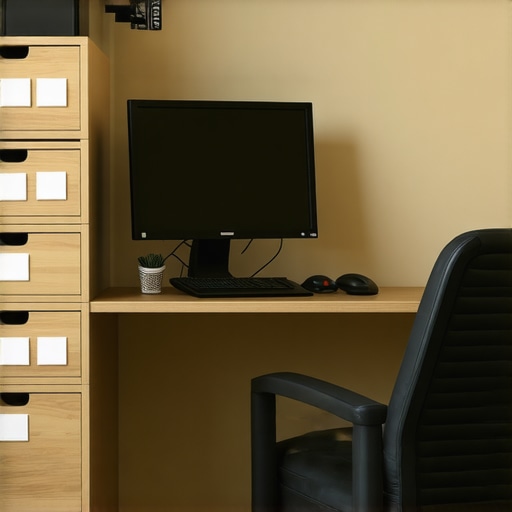
For example, I set up my monitor on a stack of sturdy books until I found an adjustable monitor arm, which made a noticeable difference in my neck comfort. Proper placement is like giving your body the right ergonomic support—think of it as the foundation of a well-built house.
Adjust Your Workstation in Phases
Don’t try to overhaul everything at once. I started by adjusting my chair height, then moved on to organizing my desk. Each small change compounded into a more comfortable, efficient workspace. Use a checklist to track your progress, and revisit your setup periodically to refine it. Good ergonomics and storage are ongoing projects, not one-time fixes.
While many believe that simply investing in a good chair or buying the latest standing desk will instantly transform their home office, the reality is far more nuanced. Let’s dig deeper into what most people get wrong about ergonomic setups and storage solutions, and why understanding these subtleties can make a real difference.
Myth: Ergonomics is Only About Comfort
A widespread misconception is that ergonomic adjustments are solely about comfort. However, research from the National Institutes of Health shows that poor ergonomic setups can lead to long-term health issues like repetitive strain injuries and chronic back pain. What feels comfortable initially may not prevent injury over time. The key is to recognize that ergonomics is an ongoing process, not a one-time adjustment.
Common Mistake: Overlooking the Importance of Dynamic Movement
Many assume that once their desk and chair are set correctly, their ergonomic concerns are solved. In truth, static postures—sitting or standing still for hours—are a major trap. Experts recommend incorporating movement into your routine, such as standing for 20 minutes every hour or doing simple stretches. This dynamic approach prevents stiffness and boosts circulation, which static setups often overlook. Check out these tips for integrating movement into your workspace.
What Advanced Users Need to Know: How Small Ergonomic Adjustments Can Have a Big Impact
For those already familiar with basic ergonomic principles, the hidden nuance lies in micro-adjustments. For example, even a slight tilt of your monitor or a minor change in keyboard angle can significantly reduce strain. According to ergonomics expert Dr. David Rempel, tiny refinements—like adjusting your chair lumbar support or elevating your monitor by a few centimeters—can prevent cumulative trauma over years. This precision tuning requires awareness and patience but can elevate your setup from adequate to optimal. Want to master these details? Explore these detailed guides.
The Trap of Cost-Only Focus
Another common mistake is prioritizing expensive equipment over proper setup. Many believe that buying the priciest chair or desk will automatically solve ergonomic problems. However, as proven by studies in occupational health, the best setup is tailored to your body’s specific needs and habits—not just price tags. For example, an adjustable standing desk paired with an affordable ergonomic chair can outperform a high-end non-adjustable desk. Focus on flexibility, not just cost, and consider these customizable options.
Have you ever fallen into this trap? Let me know in the comments!
Keeping your home office setup in top condition requires more than just initial organization and ergonomic adjustments. Regular maintenance, the right tools, and a strategic approach to long-term care are vital for sustained productivity and comfort. In this post, I’ll share the tools I personally rely on and methods to keep your workspace functioning smoothly over time.
Scheduled Maintenance and Routine Checks
Creating a maintenance schedule helps prevent small issues from becoming major disruptions. I recommend setting aside 10-15 minutes weekly to declutter surfaces, check cable connections, and tighten any loose fixtures. This routine keeps your workspace clean and ensures that your ergonomic equipment stays in optimal condition.
Tools I Recommend for Seamless Maintenance
One of my go-to tools is a digital cable tester. I use it to quickly identify faulty or loose connections in my wiring, preventing connectivity issues that can halt my workflow. Additionally, a microfiber cleaning cloth and a gentle electronics cleaner are essential for keeping screens and peripherals dust-free, which maintains clarity and extends device life.
For physical organization, I love using label makers. Labeling storage bins, cables, and even individual items makes it effortless to locate what I need, saving time and reducing frustration. I personally prefer the Brother P-touch label maker for its durability and ease of use.
Long-Term Results with Proper Maintenance
Implementing these tools and routines has drastically improved my workspace’s longevity. Regularly updating and inspecting ergonomic components like chairs and desks ensures they remain supportive. For example, I check my adjustable standing desk’s mechanisms quarterly, lubricating joints and verifying stability. This proactive approach prevents costly repairs and downtime.
How Do I Maintain My Workspace Over Time?
The key to maintaining your home office effectively is consistency. Set a recurring reminder to review your setup, clean devices, and reorganize as needed. Keep an inventory of spare parts—extra cables, batteries, or replacement parts for your ergonomic gear—so you’re prepared for inevitable wear and tear. As technology evolves, stay informed about new tools and accessories that can enhance your environment, like improved monitor arms or smarter cable management systems.
The Future of Workspace Maintenance
Looking ahead, I predict that automation and smart devices will play a bigger role in workspace upkeep. Devices that monitor device health or automatically adjust ergonomic settings could become standard, reducing manual maintenance efforts. Embracing these innovations now will prepare you for a future where your workspace self-maintains and adapts seamlessly.
Try integrating a smart cable management system or scheduling regular ergonomic checks into your routine. Small investments today will pay off with a more comfortable, efficient, and durable workspace tomorrow. For more detailed recommendations, explore these advanced tips to keep your home office in prime condition.
The Hardest Lesson I Learned About Creating a Home Office Oasis
One of the most valuable lessons I learned was that investing in your workspace isn’t just about buying the latest gadgets; it’s about understanding your unique needs and habits. Early on, I wasted money on expensive furniture that didn’t suit my body or workflow. The real breakthrough came when I realized the importance of micro-adjustments—small tweaks to monitor height, chair tilt, and keyboard angle—that made a huge difference in comfort and productivity.
3 Myths About Ergonomics That Held Me Back
Firstly, I believed that a fancy chair automatically meant ergonomic comfort. Turns out, even the most stylish chair can cause back pain if it’s not adjustable or supportive for your body. Secondly, I thought standing desks were only for those with health issues, but they actually help maintain energy levels and reduce fatigue. Lastly, I assumed that once my setup was perfect, I was done. Regular tweaks and movement are crucial to sustain comfort and prevent injury over time.
What Experts Won’t Tell You About Organizing Your Workspace
Many overlook the power of micro-organizations—like using drawer dividers or labeled storage bins—to keep essentials within reach without cluttering your surface. Experts emphasize that maintaining a clean, organized space reduces mental fatigue and improves focus. They also highlight the importance of periodic reassessment—what works today might need tweaking tomorrow as your work habits evolve.
Curated Recommendations for a Future-Proof Home Office
My essential toolkit includes the ergonomic chair and standing desk guide, which helped me pick adaptable furniture. I trust the storage solutions from Tech Gear for their durability and space efficiency. For ongoing ergonomic adjustments, I rely on expert-recommended guides that keep me updated on the latest best practices.
Embrace Your Workspace Journey — It’s About Progress, Not Perfection
Your home office setup is a reflection of your unique work style and needs. Don’t be discouraged by initial setbacks—every small improvement adds up to a more comfortable, productive environment. Remember, the goal isn’t perfection but continuous improvement. Take action today, experiment with adjustments, and watch your workspace transform into your personal productivity sanctuary.

I completely relate to the struggle of a cluttered workspace impacting productivity. When I finally took the time to categorize all my supplies and invested in a few organizational tools like drawer dividers and wall-mounted shelves, it transformed my entire workday. Not only did I spend less time digging for essentials, but I also noticed my focus improved significantly. What I find most effective is setting aside a few minutes at the end of each day to tidy up and reassess my setup. Have others found specific routines or tools that keep their workspace consistently organized and ergonomic? It seems small habits, like regular cleaning and micro-adjustments to equipment, can really make a difference in maintaining that ideal home office environment.
Reading through this post resonated with me, especially on the importance of micro-adjustments in ergonomic setups. I used to think that once I had a decent chair and desk, I was good to go, but I realized that small tweaks—like adjusting my monitor height or keyboard tilt—can really reduce strain over time. My biggest breakthrough was adding a monitor arm, which allowed me to position everything at the perfect ergonomic angle without cluttering my desk. It’s an investment that paid off by preventing neck and wrist pain during long work sessions. I also started scheduling weekly checks for my ergonomic setup and cleaning routines, which kept my workspace comfortable and efficient. Do others have tips on how they keep track of these subtle adjustments? I find that monitoring my posture and setup periodically helps me avoid postural fatigue and keeps me motivated to keep my workspace tidy as well. Fostering these habits has truly made my work-from-home experience much healthier and more productive.