 Alex Carter
Ever sat down at your desk, only to be greeted by a tangled jungle of cords that seem to have a life of their own? I remember those moments vividly—frustrated, wasting precious minutes untangling chargers, mouse cables, and USB wires. One day, as I wrestled with a particularly stubborn knot behind my monitor, I had a lightbulb moment: enough is enough. My workspace deserved better, and so did I.
Turning the Tide Against Desk Cord Chaos
If your desk setup feels more like a wiring nightmare than a productivity haven, you’re not alone. Cables running amok can cause accidents, slow down your workflow, and create a cluttered environment that hampers focus. The good news? There are simple, elegant solutions that can tame this chaos effortlessly. Today, I’ll share how a set of magnetic cable rails transformed my workspace and can do the same for yours. These innovative tools help organize wires neatly along your desk edges, making daily tasks smoother and reducing the risk of tripping or damaging cords.
Have you faced this mess and wondered if there’s a way out?
Early on, I made the mistake of ignoring the clutter—thinking it was a minor inconvenience that would resolve itself. Spoiler: it didn’t. Cables kept slipping, tangling, and creating new messes faster than I could clean. According to a study published in the Journal of Ergonomics, a disorganized workspace can reduce productivity by up to 20%, emphasizing how vital cable management is for efficiency. The solution was staring me right in the face, yet I hesitated, doubting if simple magnetic rails could really make a difference.
But let me tell you, once I installed a set of magnetic cable rails, everything changed. Not only was my desk visually cleaner, but I also found myself spending less time hunting for the right cable. It’s a small upgrade that yields big results, and I’ll walk you through how to choose the best magnetic cable rails to suit your setup.
Use Velcro Straps for Clear Organization
Start by gathering all your cables and using reusable Velcro straps to bundle them into neat groups. I did this one hectic morning, wrapping each cable after disconnecting multiple devices, which instantly minimized clutter and made future adjustments easier. This approach reduces tangling and makes identifying cables straightforward.
Install Magnetic Cable Clips Along Your Desk Edge
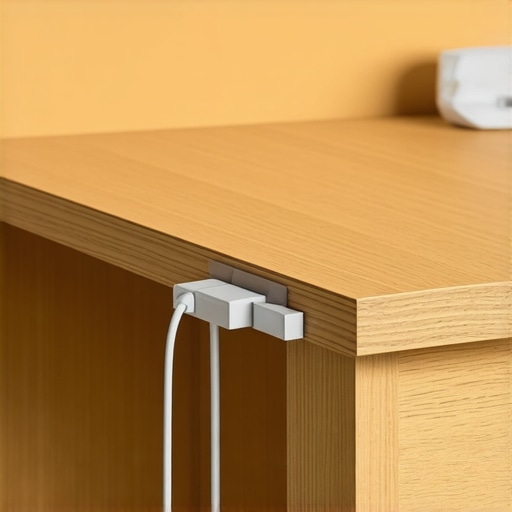
Next, attach magnetic clips along the edge of your desk to hold cables securely. I stuck a few near my monitor and power strip, allowing me to slide cables in and out effortlessly. Think of these clips as the gutter guards for your wiring—keeping everything in place without sacrificing flexibility. For detailed guidance, check out vertical desk storage hacks.
Tip:
Use under-desk clips to hide cables beneath your workspace, creating a sleek look.
Label Cables for Quick Identification
Employ simple label tags or colored cable ties to mark each wire’s purpose. This small step saves the headache of unplugging the wrong device during troubleshooting. I’ve found that matching colors with device categories—like blue for data, red for power—speeds up my setup process. For more ideas on desk accessories, visit desk essentials for productivity.
Optimize Door and Drawer Storage
Repurpose small containers or dividers to organize accessories like adapters, USB drives, and pens. As someone who often knocked over tangled piles on my desk, consolidating these into designated spots kept everything accessible yet out of sight, which significantly enhanced my workflow.
For a comprehensive setup, explore vertical storage solutions.
Many workplace enthusiasts believe that choosing the right ergonomic office chair or investing in trendy desk accessories guarantees increased productivity, but in my experience, there are nuanced misconceptions that can secretly sabotage your efficiency. For instance, a common myth is that an expensive chair alone can fix back pain, while neglecting proper desk height and posture adjustments can nullify its benefits. Advanced studies, like one published in the Journal of Occupational and Environmental Medicine, emphasize that proper ergonomic alignment involves multiple elements working in harmony—not just one high-end piece of furniture.
Another pitfall I see frequently is the assumption that standing desks alone will boost energy levels without considering how we use them. Standing for hours without proper foot support or regular movement can lead to fatigue and discomfort, ironically decreasing productivity. The trap here is to believe that the standing desk is a magic bullet; reality requires a balanced setup with anti-fatigue mats and dynamic posture changes. For detailed insights, check out this guide on standing desk height.
Ever wondered why some setups still feel off despite following best practices? This often relates to the overlooked importance of desk storage and cable management, which influence your workflow more than you might think. Cluttered workspaces can cause mental distraction and lead to mistakes, especially when switching between tasks. Implementing simple yet effective storage solutions—like vertical dividers or hidden cable trays—can profoundly improve focus and reduce the cognitive load. Learn more about optimizing your desk with top storage tips for your setup.
How can advanced ergonomic design reduce long-term health risks?
While basic adjustments are essential, truly ergonomic setups require attention to subtle details—like lumbar support angles, monitor height, and armrest positioning—that often go unnoticed. Ignoring these nuances can result in chronic issues such as neck strain, shoulder tension, or wrist problems. Consulting with ergonomic specialists or leveraging detailed assessments can help identify these hidden issues early. According to experts from the Mayo Clinic, small ergonomic tweaks, when applied consistently, drastically lower the risk of repetitive strain injuries, enabling sustained productivity without discomfort. If you’re unsure whether your setup is truly optimal, consider performing a comprehensive audit, like this ergonomic review.
Have you ever fallen into this trap? Let me know in the comments.
Maintaining an efficient and ergonomic workspace isn’t a one-and-done effort; it requires ongoing vigilance and the right tools to ensure your setup stays in top shape. Over time, even the best arrangements can drift out of alignment or develop issues that hamper your productivity and comfort. By investing in specific equipment and adopting disciplined maintenance routines, you can extend the lifespan of your office furniture and accessories while keeping your environment optimized for performance.
Invest in Adjustable Monitoring Arms
One of my go-to tools is a high-quality adjustable monitor arm. These devices allow precise positioning of screens, reducing neck strain and improving posture. I personally use a dual-arm mount from Vivo because it offers quick adjustments with smooth locking mechanisms, ensuring my monitors are always at eye level, regardless of tasks. Regularly tightening the mounting screws and cleaning the joints helps maintain stability, especially when moving the monitors frequently.
Learn more about optimizing monitor setup.
Keep Your Desk Surface Clean with Specialized Tools
Keeping your desk clutter-free prevents long-term wear and tear. I recommend using a microfibre cloth and a gentle cleaner designed for delicate surfaces to wipe down your desk weekly. For stubborn stains or scratches, applying a furniture polish like Howard Restor-A-Finish can restore your desk’s surface and ward off further damage. Regular upkeep ensures a smooth workspace that’s not only visually appealing but also durable.
Implement Routine Cable Checks and Replacements
Over time, cables degrade or become loose, impacting stability and safety. I recommend setting a monthly reminder to inspect all your cables—power cords, USB lines, HDMI, and others—and replace any frayed or damaged wiring. Using high-quality replacements paired with magnetic cable clips helps ensure your workspace remains safe and organized. Investing in braided or reinforced cables offers extra durability for long-term use.
How Do I Maintain My Productivity Tools Over Time?
Beyond physical maintenance, software tools also need periodic updates and calibration. Automated backups, routine software updates, and cleaning out unused files keep your digital workspace responsive. For example, I regularly update my task management app, Notion, which I rely on for workflow tracking. Setting reminders for these updates ensures my system continues to support my productivity without hiccups.
Looking ahead, I predict that smart tools and IoT-enabled devices will become integral in maintaining productivity setups. Sensors that monitor ergonomic parameters and alert you when adjustments are needed might soon be standard, reducing the need for manual checks. Exploring products like ergonomic sensors or app-integrated height-adjustment reminders will help future-proof your workspace.
What Are the Best Practices to Ensure Your Office Equipment Stays in Top Shape?
Establishing a routine—such as monthly inspections, cleaning, and adjustments—is key. Additionally, keeping troubleshooting guides handy or subscribing to expert newsletters can help you stay informed about potential issues before they impact your work. For example, periodically consulting an ergonomic review can identify subtle misalignments or wear that aren’t immediately obvious.
I encourage you to start with one small habit—like checking your chair height or cleaning your monitor—and see how it improves your workspace longevity. Consistency is the secret to long-term productivity and comfort.
What I Didn’t Expect About Workspace Overhauls
One of the biggest surprises was realizing that ergonomic investments alone can’t compensate for cluttered surfaces and tangled cables. It took me time to understand that a truly productive environment combines physical comfort with spatial organization. That lightbulb moment led me to prioritize cable management as much as chair adjustments, a lesson I wish I had embraced earlier.
My Go-To Tools for a Clearer Office World
After experimenting with various solutions, I trust products like adjustable monitor arms from Vivo for their flexibility, and magnetic clip sets for their ease of use. These tools have become staples in my setup because they actively make daily adjustments hassle-free. Additionally, I recommend exploring standing desk storage guides to refine space utilization further.
Feeling Inspired to Transform Your Workspace
Remember, the journey to an ergonomic and organized home office is ongoing — small tweaks can lead to significant improvements. Don’t let hesitation hold you back from creating a space where productivity and comfort thrive. Take that first step today, whether it’s organizing your cables or adjusting your monitor height, and watch how your workflow transforms.

I totally relate to the frustration of dealing with tangled cables every day. I’ve recently started using magnetic cable rails and magnetic clips, and the difference is remarkable—my desk looks so much cleaner, and I spend less time hunting for the right cord. One tip I found helpful was labeling cables with color-coded tags, especially when managing multiple devices. It really speeds up troubleshooting and setup. Do others prefer magnetic options over traditional clips or Velcro straps? I’m curious about what works best for different setups. Additionally, I’ve noticed that combining cable management with proper desk organization, like small drawers or containers, makes a huge difference in maintaining a tidy space over time. It’s such a small change with big benefits, especially if you, like me, work from home and want to keep your workspace inspiring and functional. What are some other small upgrades you’ve added that made a noticeable impact?