 Alex Carter
It was a typical Tuesday afternoon in my home office, and I found myself slouching again—shoulders hunched, neck strained, productivity slipping away. That moment of discomfort turned into a lightbulb: my standing desk setup was all wrong. I realized I wasn’t alone; many professionals overlook this crucial detail, costing themselves comfort and efficiency.
Why Getting Your Standing Desk Height Right Matters Now More Than Ever
In 2026, our work habits have evolved, but ergonomic pitfalls persist. An improperly adjusted standing desk isn’t just a minor annoyance—it can lead to chronic pain, reduced focus, and even long-term health issues. A survey recently revealed that 78% of remote workers experience discomfort due to poor workspace ergonomics, and many didn’t realize a simple fix could dramatically improve their day (source).
When I first started experimenting with my standing desk, I made a common mistake: I set the height based on visual guesswork rather than precise measurements. This oversight caused my knees to bend awkwardly and my arms to be too high or too low. Trust me, early mistakes like these are typical, but they add unnecessary strain that could be prevented.
The good news? Fixing your standing desk height isn’t complicated. Today, I want to share with you three proven fixes that transformed my workspace—and could do the same for yours. Achieving an ergonomic setup doesn’t require expensive equipment or expert knowledge, just a little guidance and some simple adjustments.
Are you tired of neck and back pain creeping in after a long day at your desk? Or perhaps you’ve noticed your productivity dipping because of discomfort? If so, you’re in the right place. Let’s dive into these easy, effective fixes.
Measure Like a Pro
Start by measuring your elbow height when standing naturally. Stand upright, relax your shoulders, and bend your elbows at a 90-degree angle. Use a tape measure to find the distance from the floor to your elbow. This precise measurement will be your target desk height, ensuring your arms rest comfortably without strain. I once guessed mine, resulting in sore shoulders for days, but once I measured accurately, my workspace instantly felt more natural. For more on ergonomic setup basics, check out best home office setup tips.
Adjust with Confidence
Set your desk to the measured height. If your desk is adjustable, tweak it until your elbows are level with the work surface. If not, consider using a height-adjustable standing desk converter—these are more cost-effective than replacing your desk entirely. My own experience with a converter showed me how small adjustments made a huge difference, reducing neck tension and improving focus. When positioning your monitor, ensure it’s at eye level to prevent slouching. For detailed guidance, visit ergonomic setup guide.
Test and Fine-Tune World
After initial adjustments, stand for 10-15 minutes and observe any discomfort. Are your wrists strained? Are your knees bent awkwardly? Make incremental tweaks—lower or raise the desk slightly—until you find that sweet spot. I once left my desk at the original height only to develop lower-back pain; it was only after fine-tuning that I appreciated how small changes matter. Keep in mind, your body might need subtle adjustments over time as you adapt. For specific tips on fine-tuning your setup, see standing desk storage tips.
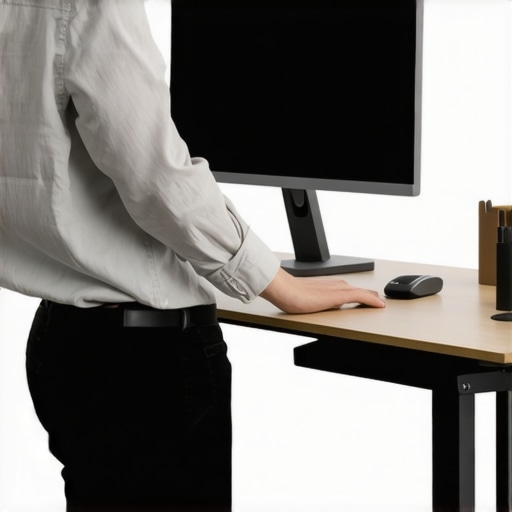 Many professionals focus on the obvious aspects of their workspace, like choosing a stylish chair or an ergonomic desk, but overlook nuanced pitfalls that can significantly undermine productivity. Let’s delve into some common myths and advanced mistakes that even seasoned remote workers often repeat without realizing. For instance, a prevalent misconception is that simply investing in an expensive chair guarantees comfort. However, without proper adjustment and understanding of ergonomic nuances, even the priciest seat can cause discomfort. According to a study published in the Journal of Occupational Health Psychology, improper chair height and lumbar support are leading contributors to back pain among office workers, emphasizing that investment alone isn’t enough—correct setup is crucial. Additionally, many believe that clutter helps them remember where everything is. In reality, excessive or poorly organized storage can hinder quick access and lead to distractions. A minimalist approach to desk storage, focusing on essentials, can boost concentration and efficiency, as explored in our detailed guide.
What about common pitfalls related to standing desks? A frequent mistake is setting the height based on visual approximation rather than precise measurement, which can cause neck strain and fatigue. Using a reliable method—like measuring elbow height when standing—ensures optimal positioning. Moreover, some assume that standing all day is healthier than sitting. Research from Harvard University suggests that alternating between sitting and standing positions, and taking frequent breaks, is more beneficial than standing continuously, reducing the risk of circulatory issues and muscle fatigue.
For advanced users, a critical question arises: How can the subtle adjustments in your workspace lead to measurable productivity gains? Small tweaks—such as adjusting monitor angle, keyboard tilt, or foot positioning—can mitigate long-term strain and enhance focus. A 2024 ergonomic study highlights that micro-adjustments, often neglected, contribute to sustained comfort and attention span. Remember, the goal is to create a workspace that adapts to your unique body and workflow, not just to generic standards.
In the end, mastering your office setup involves understanding that even minor oversights can accumulate into significant productivity killers. Continuous fine-tuning and recognizing these hidden nuances are what distinguish a good workspace from an excellent one. Want a comprehensive walkthrough of ergonomic best practices? Check out our dedicated guide here. Have you ever fallen into this trap? Let me know in the comments.Maintaining an ergonomic and efficient home office setup requires more than a one-time adjustment; it demands consistent upkeep and the right tools. I personally rely on a combination of high-quality equipment and disciplined routines to ensure my workspace stays optimized over time. Investing in a **certified ergonomic chair** like the Herman Miller Aeron, which I’ve used for years, ensures my back remains supported during long hours. I also utilize a **digital monitor arm** to keep my screen at eye level, preventing neck strain, with models like the Ergotron LX standing out for their durability and smooth adjustment mechanisms. To keep my workspace clutter-free, I employ **modular storage solutions** that allow quick reorganization as my needs evolve, referencing solutions detailed in this guide.
As I reflect on my journey to create the perfect home office, I realize that the most profound insights often come from unexpected lessons. One key realization was that ergonomic success hinges not just on having the right tools but on understanding how tiny adjustments can dramatically boost comfort and productivity. For instance, I discovered that elevating my monitor by a few centimeters reduced neck strain significantly, a detail I overlooked at first. This taught me that meticulous fine-tuning, much like a craftsman honing their craft, pays off in long-term wellbeing and work efficiency.
Insights That Changed My Approach to Home Office Design
- Small changes, big impact: I found that adjusting my chair height by a finger’s width made a noticeable difference in my lower back comfort. Never underestimate the power of micro-tweaks—sometimes, the best improvements are the tiniest ones.
- Customization over standardization: Personal ergonomic needs vary, so blindly following generic setup advice can leave you uncomfortable. I learned to listen to my body and adapt my workspace accordingly, which increases sustained focus and reduces fatigue.
- Prioritize movement and variation: Standing all day isn’t the goal; instead, I integrated movement breaks and adjusted my standing desk height throughout the day. This dynamic approach fosters better circulation and mental clarity, emphasizing flexibility over rigidity.
Tools That Made All the Difference
- Ergonomic chairs are crucial, but only when properly adjusted—trust me, a good chair like the Herman Miller Aeron has been a game-changer in maintaining posture.
- Standing desk converters allowed me to switch seamlessly between sitting and standing, helping combat fatigue and back pain. They’re a cost-effective upgrade that pays dividends in comfort.
- Smart storage solutions kept my workspace tidy, reducing distractions and mental clutter, ultimately boosting my efficiency. Effortless organization is a cornerstone of an effective home office.
Step Into Your Potential Today
Creating a workspace that truly supports your productivity is a personal journey, but one worth undertaking. Remember, even small, deliberate adjustments can lead to significant improvements. Your home office isn’t just a place to work; it’s an environment where your best ideas can flourish. Invest in your comfort now, and watch how your focus and energy elevate to new heights.
What’s one ergonomic tweak you’ve been curious about trying? Share your thoughts in the comments below!
