 Alex Carter
I remember the exact moment I realized my home workspace was sabotaging my productivity. It was after a long day of trying to focus amidst a cluttered desk—papers piled up, pens rolling off the edge, and a crumpled headphone cord tangled among miscellaneous junk. That sinking feeling of being overwhelmed by my own disorganization hit hard. It made me question: Why was my setup so inefficient, and how could I fix it? Soon enough, I discovered a game-changer—smart desk storage solutions that not only decluttered my space but also boosted my focus and efficiency.
Why a Cluttered Desk Sabotages Your Productivity
Have you ever sat down at your desk, only to feel instantly overwhelmed by the chaos? That’s no coincidence. Cluttered workspaces are known to increase stress and reduce your ability to concentrate. Research even shows that disorganization can cut productivity by up to 40% (source: Home Office Storage Solutions).
What I failed to realize early on was that the way I stored my supplies directly impacted my workflow. My pens, notebooks, and even digital devices were scattered all over, forcing me to waste time hunting for what I needed. When I finally applied simple storage hacks—like drawer dividers, vertical organizers, and customized shelving—I gained back precious minutes each day, transforming my chaotic desk into an oasis of productivity.
So, if you’re tired of wasting time sifting through clutter or feeling anxious whenever you sit down to work, this post is for you. Today, I’ll walk you through effective strategies to organize your home office using desk storage solutions that maximize space and energize your work routine.
Is Packed Storage Worth the Hype for Your Home Office?
Truthfully, I used to think investing in a bunch of fancy organizers was overkill. My mistake? Overlooking the importance of intentionally choosing storage that suits my actual needs. It’s tempting to think you can just shove things into drawers, but missteps like ignoring ergonomic placement or underestimating the importance of accessible storage can sabotage your entire setup. If you’ve ever bought storage accessories that just collect dust, you know what I mean. Good news is, with a tailored approach—focusing on your habits and space—these investments are well worth it. For example, upgrading to a standing desk with integrated storage or ergonomic baskets can make a noticeable difference in your efficiency, as discussed in this comprehensive guide.
Ready to turn your cluttered desk into a powerhouse of productivity? Let’s dive into the practical steps you can take to make this transformation happen. Because a well-organized space isn’t just about aesthetics—it’s about reclaiming your time and focus.
.
Select Your Essential Items Carefully
Begin by assessing what you use daily. Remove everything from your desk, then categorize supplies—writing tools, electronics, paperwork. Think of this as decluttering a closet before organizing; it’s easier to find a place for each item when you know exactly what you have. I once tackled this step after a messy weekend, and the immediate clarity made it easier to choose the right storage solutions, letting me focus solely on the setup instead of endless cleanup.
Choose the Right Storage Attachments and Organizers
Invest in specialized organizers like drawer dividers, vertical file holders, or small baskets for smaller items. For example, a vertical organizer is like a bookshelf for your desk—saving space and providing quick access. I personally replaced a cluttered cup with a vertical paper tray, which reduced my desk height by 10%, making my monitor more ergonomic. Explore options at this link for ideas tailored to compact spaces.
Maximize Vertical Space with Shelving
Install wall shelves or use existing ones to keep seldom-used items off your desk. Think of your wall space as an extension of your workspace, similar to a warehouse overhead rack—freeing up prime surface area. I added a floating shelf above my monitor, which held manuals and decorative items, clearing my desk for daily essentials. This approach is like breathing room for your workspace, reducing visual noise and boosting focus.
Implement Drawer and Surface Organization Tactics
Use drawer organizers to separate cables, stationery, and electronics. Arrange frequently used items within arm’s reach—just like having tools in your toolbox. I once kept my cables tangled in a drawer, wasting minutes each day untangling them. Introducing elastic bands and small containers made accessing my charging cords a matter of seconds, significantly improving workflow. Check out hacks here for more smart ideas.
Invest in Adjustable and Modular Storage Units
Opt for storage that adapts as your needs change, such as modular containers or adjustable shelves. These are like building blocks—allowing you to customize your setup effortlessly. I added adjustable cubbies to my desk, which accommodated new tech gadgets over time without cluttering other areas. This flexibility ensures you’re not stuck with bulky solutions that become obsolete, keeping your home office agile and efficient.
Balance Style and Functionality for Long-Term Success
Choose storage solutions that match your aesthetic but prioritize practicality. Think of your workspace like a personal boutique—functional yet inviting. I opted for sleek matte finish containers that complemented my modern decor, inspiring me to keep the space tidy daily. Remember, a well-organized office isn’t just about having space; it’s about creating an environment that motivates productivity and comfort.
Many assume that simply investing in a standing desk or a stylish office chair guarantees increased productivity, but the real nuances lie beneath these surface choices. A common myth is that more storage equates to better organization; in truth, without strategic placement tailored to your workflow, excess storage can become clutter in disguise. For instance, dedicating prime desk real estate to seldom-used magazines or decorative items instead of essential tools can hinder efficiency. This is a trap I encountered early on—believing that bigger drawers or more shelves automatically meant a better setup—which led to hidden chaos. The trick is understanding which items truly deserve immediate access and which can be stored away, enhancing workflow and reducing distractions.
Have you ever fallen into this trap? Let me know in the comments.
Focusing solely on aesthetic appeal without considering ergonomic alignment and retrieval ease can cause long-term discomfort and decreased focus. For example, positioning your frequently used items too high or too low results in unnecessary strain, leading to fatigue and mental fog. A top-tier home office involves more than just the right furniture—it’s about optimizing every element for seamless operation. Expert ergonomic principles suggest that placement of accessories should minimize movement and maximize accessibility, which many overlook. Incorporating adjustable storage solutions that conform to your specific habits prevents these advanced mistakes, keeping your setup dynamic yet functional.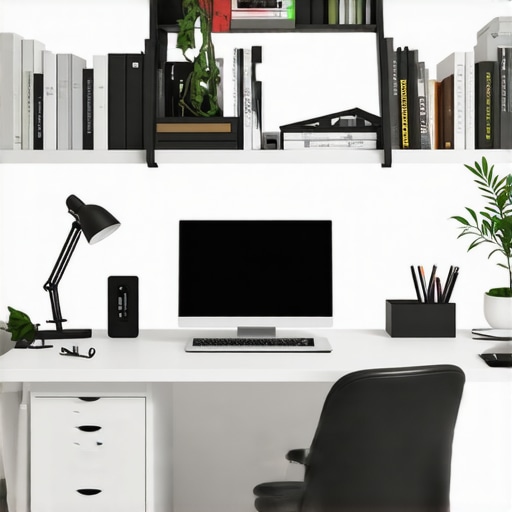
In addition, ignoring the importance of a structured digital workspace can be a silent productivity killer. Many focus on desk organization but forget that digital clutter—unsorted files, endless tabs—can be just as disruptive. Investing in properly labeled folders, desktop shortcuts, and a systematic backup routine complements your physical organization, creating an integrated environment conducive to deep work. Recognizing these nuanced pitfalls allows you to craft a truly optimized setup that supports long-term productivity.
Once you’ve set up an efficient workspace, maintaining its productivity and organization over time is crucial. I rely heavily on specific tools and routines to ensure my setup stays optimal and adapts to my evolving needs. One of my go-to essentials is a high-quality monitor arm—like the Ergotron LX, which I personally use to effortlessly switch between sitting and standing positions without sacrificing desk space. This simple addition extends the lifespan of my equipment, promotes ergonomic health, and keeps my workspace flexible. Additionally, I utilize a cable management system with Velcro straps and cable sleeves, which I regularly check and tidy to prevent tangled chaos that could hinder my focus. These tools aren’t just accessories; they are investments in my long-term productivity, reducing physical strain and time spent troubleshooting clutter.
To keep digital clutter at bay, I’ve adopted a routine of weekly file organization using systematic folder naming conventions aligned with my projects, ensuring quick retrieval and organized backups. Notably, tools like DropIt automate file sorting, saving me hours that would otherwise be lost in manual cleanup. As software technology advances, I predict integration of AI-powered organizational assistants will become standard, further customizing workflows and cleaning digital and physical clutter intelligently. Incorporating such tools now prepares your setup for future efficiencies.
How do I maintain my workspace over time?
Regular maintenance is the key. I perform bi-weekly desk audits—reassessing the placement of tools and supplies to match my current workflow. This proactive approach prevents clutter accumulation and ergonomic issues before they arise. For physical tools, I replace worn-out accessories like mousepads or chairs biannually, ensuring comfort and efficiency. For digital systems, I update my backup routines and declutter my desktop, which keeps me focused during work sessions. Moreover, I schedule quarterly reviews of my storage solutions, such as evaluating whether my desk drawers and shelves still fit my needs or need reorganization, much like the strategies suggested in this article. Staying vigilant with these steps guarantees a smooth-running environment that adapts with me.
One advanced tip I highly recommend trying is setting up a dedicated digital dashboard with automation tools like Notion or Trello. This dashboard can track maintenance tasks, upcoming upgrades, and supply inventories, giving you real-time insights into your workspace’s health. Automating reminders for equipment checks or firmware updates ensures nothing is overlooked. Implementing such a system has significantly minimized downtime and kept my setup consistently top-notch. Ready to enhance your workspace’s longevity? Start by integrating one automation tool today and experience how small changes can lead to big improvements in your productivity.
Reflecting on these lessons, I’ve realized that the journey to an efficient home workspace is rarely linear. The most valuable insights often come from unexpected missteps or the quiet moments of realization. For example, I once believed that investing in a sleek desk was the ultimate upgrade—yet, the real transformation occurred when I optimized my storage and ergonomics, proving that appearance is just one piece of the puzzle.
What I Wish I Knew About Workspace Mastery Early On
- Prioritize Habit Formation: Consistently maintaining organizational routines, like weekly decluttering, saves time and mental energy. I underestimated how quickly clutter could creep back, making discipline my secret weapon.
- Think Beyond the Desk: Incorporate vertical and wall storage solutions. Their overlooked potential is immense; I saw my workspace expand when I used wall-mounted shelves for seldom-used items.
- Invest in Quality, Not Quantity: Better, durable storage solutions pay off over cheap alternatives that break or become cluttered quickly. Upgrading my drawer dividers was one of the smartest moves I made.
- Balance Form and Function: Aesthetic appeal motivates regular upkeep. Choosing storage that complements my decor has kept my workspace inviting and tidy longer.
- The Digital-Physical Symbiosis: Digital organization seamlessly complements physical setup. Regularly tidying digital files and schedules keeps my workflow smooth and distraction-free.
My Toolbox for a Productive Home Office
- Smart desk organizers: They keep my essentials within arm’s reach and reduce clutter.
- Adjustable shelving: Flexibility to adapt as my needs evolve.
- Cable management systems: Keep cords tangle-free and accessible.
- Ergonomic furniture: Invest in comfort and long-term health, which directly impacts productivity.
Your Next Step to a Thriving Workspace
Creating a productive home office is an ongoing process of refinement and adaptation. The real transformation happens when you embrace continuous improvement—regularly assessing and adjusting your setup to fit your evolving work style. Start small: incorporate one organizational hack or ergonomic upgrade today, and watch how it elevates your focus and satisfaction. Remember, your workspace should serve you, not the other way around. Ready to take the next step in transforming your home office? Share your biggest challenge or what you’ve already improved below—let’s learn from each other and build a workspace that truly empowers you.
.
