 Alex Carter
I remember the exact moment I realized my home office was sabotaging my productivity. I was slouched in my chair, tangled in cords, surrounded by clutter, and feeling more drained than focused. It was like my workspace was working against me, not for me. That lightbulb moment led me down a path of trial, error, and discovery, ultimately transforming my setup into a powerhouse of efficiency. If you’ve ever felt overwhelmed by your desk or frustrated with your workflow, you’re not alone. Today, I’m going to share how the right standing desk and smart storage can revolutionize your work-from-home experience.
Why Your Workspace Could Be Killing Your Focus
There’s a common misconception that just having a desk and a chair is enough to get work done. But anyone who’s struggled with back pain, constant distractions, or a cluttered surface knows that your environment directly impacts your productivity. I used to think that as long as I had my laptop, I was good to go. Turns out, I was missing out on the power of ergonomic design and organized storage. Experts now confirm that an optimized workspace can boost focus, reduce fatigue, and even improve mental clarity. According to a study published by the American Journal of Preventive Medicine, ergonomic work setups can increase productivity by up to 25%. That’s no small number, and it makes sense when you consider how much time we spend at our desks.
If you’re tired of feeling sluggish or overwhelmed every workday, it might be time to rethink your setup. The good news is, small changes—like switching to a versatile standing desk or installing efficient storage—can make a huge difference. I’ll guide you through the essentials to create a workspace that works as hard as you do. But first, ask yourself: have you faced the frustration of a cluttered desk, or felt your posture suffering by the end of the day? If so, keep reading. We’re about to get practical.
Is Standing Desk and Storage Actually Worth the Hype?
Early on, I made the mistake of investing in a cheap, adjustable desk that wobbled every time I typed. I thought that the hype around standing desks was just marketing fluff. Turns out, a good standing desk can drastically reduce back pain and help break the cycle of sitting for hours. Combined with smart storage solutions, it creates a workspace that’s not only healthier but also more organized. This isn’t just about trends; it’s backed by research and real-world results. If you’re skeptical, I get it. I’ve been there. But trust me, a well-chosen standing desk and some clever storage hacks can transform your workday, making it more comfortable and productive. Ready to learn how to do it right? Let’s dive into the essentials that will change your home office for good.
Set Up for Comfort and Efficiency
Start by choosing a sturdy, adjustable standing desk that fits your space and budget. I once bought a cheap model that wobbled whenever I typed, which was frustrating. After replacing it with a quality desk, I noticed an immediate reduction in back pain and fatigue. For the best options, check out top standing desk and storage solutions. Make sure your desk height allows your elbows to bend at a 90-degree angle and your monitor is at eye level to prevent neck strain.
Arrange Your Workspace Strategically
Think of your desk as a command center—everything should be within arm’s reach but not cluttered. Place your frequently used items, like your keyboard, mouse, and notepad, directly in front of you. Use vertical space for storage to free up surface area. I organized my supplies into small containers, which kept my desk clean and made finding things quick. For ideas on effective desk organization, visit essential desk storage tips.
Incorporate Smart Storage Solutions
Maximize your space with multifunctional storage hacks. For instance, drawer dividers can keep cables, pens, and sticky notes tidy. I installed wall-mounted shelves above my desk to hold books and decorative items, which cleared my workspace and added personality. Consider modular storage units that can be customized to your needs. Check out top standing desk storage hacks for more ideas.
Optimize Ergonomics and Accessibility
Adjust your chair and desk height so your feet rest flat on the floor and your knees are at a 90-degree angle. Use an ergonomic chair with lumbar support; I found that switching to a model recommended in ultimate guide to ergonomic chairs significantly improved my posture and focus. Keep frequently used items close to avoid repetitive reaching, which can strain your shoulders and back.
Manage Cables and Clutter
Cables are the sneaky enemies of an organized workspace. Use cable clips, sleeves, or under-desk trays to hide them out of sight. I used a combination of cable clips and a cable box, which kept my desk surface clean. For more advanced cable management ideas, see standing desk storage solutions.
Maintain and Adjust Regularly
Your setup isn’t a set-it-and-forget-it deal. Regularly review your workspace to ensure everything remains ergonomic and organized. Small tweaks, like raising your monitor or adding a footrest, can make a big difference. Remember, a dynamic setup keeps you comfortable and productive over time.
Many of us fall into the trap of believing oversimplified myths about setting up a home office, especially when it comes to ergonomic furniture and storage. One widespread misconception is that simply switching to a standing desk will automatically boost productivity. While standing desks offer benefits, their effectiveness depends heavily on proper usage and integrated ergonomic practices. For instance, if you don’t adjust the desk height correctly or neglect to incorporate movement, you might end up with discomfort rather than gains. To truly harness the potential of a standing desk, it’s essential to learn the nuances of ergonomic alignment. A misadjusted desk can cause neck, back, or wrist strain, which defeats the purpose. For a comprehensive look at how to optimize your setup, check out best desks, chairs, and storage for 2024.
Another common myth is that organization is just about aesthetics — a tidy desk looks nice but doesn’t impact productivity. This is false. Clutter hampers focus and increases stress, leading to mental fatigue. The real trick lies in smart storage solutions that keep your workspace functional and adaptable. For example, modular storage units and vertical shelving can maximize space and accessibility without sacrificing style. Many overlook these details, but they are crucial for maintaining an efficient workflow. Dive into essential desk storage tips to learn more about organizing your workspace effectively.
Now, here’s an advanced question that often trips up even seasoned remote workers: How can I balance ergonomic adjustments with dynamic movement to prevent strain? The key is to incorporate micro-breaks and movement routines into your day. Standing or sitting for long periods, no matter how perfect your setup, can cause problems. Experts recommend alternating between sitting and standing every 30 minutes and adding stretches or short walks. A study published in the Journal of Occupational and Environmental Medicine emphasizes that dynamic work routines reduce musculoskeletal discomfort and improve circulation. You can optimize this approach with tools like sit-stand timers or ergonomic reminders, ensuring your setup adapts to your activity patterns. Remember, a truly effective productivity setup isn’t static—it’s flexible and mindful. Have you ever fallen into this trap? Let me know in the comments.
Maintaining your home office setup is crucial to ensuring it continues to serve you well over the long term. From ergonomic furniture to organizational tools, regular upkeep and strategic upgrades can dramatically improve your productivity and comfort. One must-have for sustained success is investing in quality tools that enhance your workspace’s durability and functionality.
For example, I rely heavily on a cable management system that includes under-desk cable trays and velcro straps. These simple tools prevent tangled cords from becoming a daily annoyance and help maintain a clean, professional look. Over time, cables can degrade or become damaged, so regularly inspecting and replacing worn-out sleeves or clips is a smart habit. This proactive approach extends the lifespan of your peripherals and reduces potential hazards.
Another essential aspect is keeping your ergonomic furniture in top shape. My adjustable standing desk, for instance, benefits from periodic calibration to ensure smooth height adjustments. I also use a quality ergonomic chair that requires occasional cleaning and lumbar support adjustments. Following manufacturer guidelines for maintenance can prevent unnecessary wear and tear, ultimately saving money and discomfort in the long run. For detailed recommendations, check out this guide on ergonomic furniture maintenance.
Software tools also play a vital role in keeping your workspace organized and efficient. I swear by digital task managers like Todoist, which helps prioritize daily activities and set reminders for equipment checks or updates. Cloud storage solutions such as Dropbox or Google Drive ensure your files are backed up and accessible, reducing the risk of data loss. Regularly updating your software and security patches protects against vulnerabilities, keeping your setup safe and functional.
Looking ahead, I believe the trend toward smart home integration will continue to grow. Imagine having your standing desk, lighting, and even your office chair connected via IoT devices that notify you when maintenance is due or automatically adjust for optimal ergonomics. Staying ahead in this evolving landscape means adopting tools that are scalable and adaptable to future tech advancements.
How do I keep my workspace functioning smoothly over time?
The secret is routine maintenance and strategic upgrades. Schedule monthly checks for cables and furniture, clean surfaces regularly, and stay updated on the latest ergonomic recommendations. Incorporate smart tools like sit-stand timers or ergonomic alerts to remind you to stretch or adjust your setup. By investing in quality equipment, performing regular upkeep, and embracing new technology, you’ll create a workspace that remains productive and comfortable for years to come. I encourage you to try implementing a comprehensive maintenance routine this week—your future self will thank you.
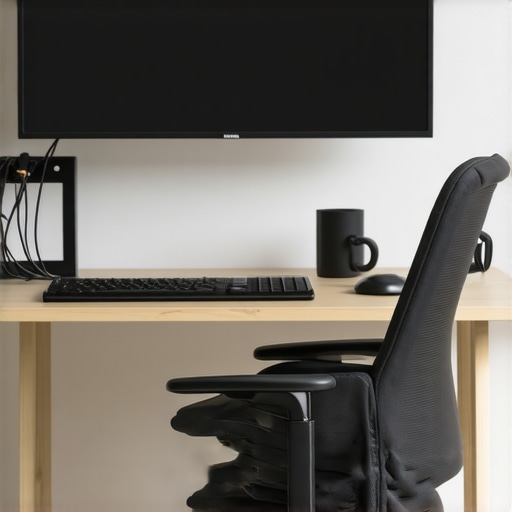
The Hardest Lesson I Learned About home office,standing desk,office chair,desk storage,productivity setup
One of my biggest realizations was that a beautiful, modern desk isn’t enough—it’s all about how you customize and maintain it. I once believed that investing in high-end furniture alone would solve my productivity issues, but I soon discovered that ongoing adjustments and personal tweaks are what truly make a difference. Small details like the height of your monitor or the placement of your storage can drastically improve your focus.
3 Myths About home office,standing desk,office chair,desk storage,productivity setup That Held Me Back
I fell for the myth that standing desks automatically boost productivity—turns out, only if you use them correctly. Likewise, I thought clutter was just an aesthetic issue, but it deeply impacts mental clarity. Finally, I believed ergonomic chairs were a luxury, not a necessity—until back pain forced me to re-evaluate. Challenging these myths opened my eyes to smarter workspace habits.
What Experts Won’t Tell You About home office,standing desk,office chair,desk storage,productivity setup
Many professionals overlook the importance of integrating movement routines into their ergonomic setups. Standing for hours without shifting can cause discomfort, so I learned to incorporate micro-breaks and stretches into my day. Also, the secret lies in adaptable furniture—adjustable desks and chairs that evolve with your needs. These insights aren’t always front and center but can dramatically elevate your work-from-home experience.
Curated Recommendations
For top-quality desks, I trust best desks and storage solutions for 2024—they offer reliable, ergonomic options that stand the test of time. My favorite ergonomic chair comes from a comprehensive guide to ergonomic chairs—it’s adjustable and provides excellent lumbar support. When it comes to organization, I swear by essential desk storage tips that keep my workspace clutter-free and inspiring. Lastly, I recommend exploring smart storage hacks for standing desks—they maximize space and efficiency effortlessly.
Embrace Your Home Office Journey Today
Remember, transforming your workspace isn’t a one-time fix; it’s a continuous journey of small improvements and mindful adjustments. Your home office has the potential to be a powerhouse of productivity and comfort—it’s all about making strategic choices and staying proactive. Start today by reviewing your setup, trying out new organization ideas, or experimenting with ergonomic tweaks. Your future self will thank you for the effort.
What’s one change you’re excited to try in your home office setup? Share below—I’d love to hear your plans and help you refine them!
