 Alex Carter
Ever found yourself slouching so badly at your desk that you wake up with a stiff neck and a backache? I used to ignore my discomfort, thinking it was just part of working from home. That was until I hit a point where my productivity tanked, and I realized I couldn’t ignore the toll my poorly set up workspace was taking on my body. It was a lightbulb moment — I needed a better ergonomic setup, pronto.
Why Your Home Office Needs an Upgrade Right Now
We spend hours in our home offices, often sacrificing comfort for convenience. But this short-term thinking can lead to long-term health issues, like chronic pain or repetitive strain injuries. According to a study published by the Harvard School of Public Health, improper ergonomics can increase the risk of musculoskeletal disorders by nearly 50%. That’s a staggering number, and it made me realize how crucial it is to invest in a workspace that supports my health and productivity.
If you’re feeling the same frustration — constantly adjusting your position, experiencing aches that just won’t quit — you’re not alone. Many of us have made the mistake early on of ignoring ergonomics, thinking a basic chair will do. Trust me, I did the same. I initially bought a cheap chair because I thought it was a minor detail. But that mistake cost me dearly in comfort and focus. Now, I know better, and I want to help you avoid that same pitfall.
What’s the real secret behind a productive home office? It’s all about smart furniture choices and organization. Want to learn how to maximize your space, upgrade your chair, and add a standing desk that actually works? Keep reading — I’ve got some proven tips and product ideas that will make your workspace your favorite place to be.Time to Fix the Setup and Boost Your Day
Ready to feel better while working? Let’s dive into the practical steps to create an ergonomic home office that’s both comfortable and efficient. Whether you’re starting from scratch or just looking to improve what you have, I’ll guide you through the essential upgrades — from choosing the right ergonomic chair to optimizing your standing desk setup. You can find the best options and tips in my comprehensive guides, like optimizing desk storage for better productivity or exploring the best ergonomic chairs for home offices.
So, do you often find yourself battling discomfort during work hours? If yes, you’re in the right place to make a change. Let’s get started on transforming your workspace into a health-boosting, productivity-enhancing haven!
Choose the Right Ergonomic Chair for Comfort and Support
Start by evaluating your current chair. If it’s causing discomfort, it’s time to replace it with an ergonomic model. Look for chairs with adjustable height, lumbar support, and breathable fabric. I once ordered a chair based solely on price, but after a week of back pain, I returned it and invested in a better one. The difference was immediate—my posture improved, and focus increased.
Adjust Your Chair Correctly
Set the chair height so your feet rest flat on the floor and your knees are at a 90-degree angle. Adjust the lumbar support to fit the natural curve of your lower back. Ensure your hips are slightly higher than your knees to promote proper posture. I spent 15 minutes fiddling with these settings, and the relief was noticeable within hours. Proper adjustment is the foundation of ergonomic comfort.
Optimize Your Standing Desk Setup
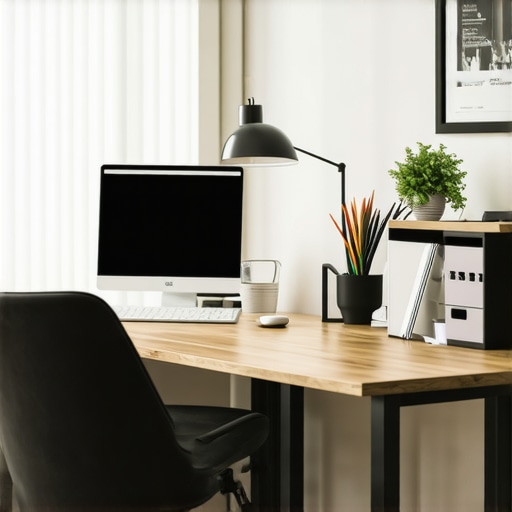
Standing desks are game-changers but only if set up correctly. When I first switched, I realized my monitor was too low, causing neck strain. Use a monitor riser or adjustable stand to bring the screen to eye level. Keep your keyboard and mouse at a height where your elbows are bent at roughly 90 degrees and wrists are straight. I also added a anti-fatigue mat, which made standing much more comfortable during long work sessions.
Incorporate Movement into Your Routine
Set a timer to remind yourself to switch between sitting and standing every 30 minutes. During breaks, walk around or do simple stretches. This practice prevents stiffness and boosts circulation. I started with five-minute walks, which helped me stay energized and focused throughout the day.
Maximize Desk Space for Efficiency
A cluttered desk hampers productivity and causes frustration. Use storage solutions to keep essentials within reach without cluttering your workspace. Organize cables, documents, and supplies neatly to create a clean environment that promotes focus. I found that investing in a few drawer organizers and cable clips made a significant difference.
Declutter Regularly
Schedule weekly cleaning sessions to maintain an organized space. A tidy desk reduces distractions and stress, making work more enjoyable. Remember, your environment influences your mindset—keep it simple, functional, and inspiring.
Combine Comfort with Productivity
Creating an ergonomic home office is an ongoing process. Regularly assess your setup and make adjustments as needed. Use a combination of ergonomic chairs, adjustable standing desks, and smart organization to craft a workspace where you can thrive. For more details on top setups, check out top desks, chairs, and storage options for 2024.
Many people assume that investing in ergonomic furniture is a one-time fix that guarantees comfort and health benefits. However, this is a misconception. In reality, most users overlook the importance of proper adjustment and routine evaluation of their setup. For instance, an ergonomic chair bought last year can become less effective if not regularly checked and adjusted to fit your evolving posture needs. According to a study published by the National Library of Medicine, consistent ergonomic assessments are vital to prevent strain and injury. Myth: Once you buy ergonomic furniture, your worries are over. Reality: Ergonomics is an ongoing process that demands attention and fine-tuning.
Are Standing Desks Always Better Than Sitting?
Many believe that standing desks are the ultimate solution for health and productivity. While they do offer benefits, such as improved circulation and reduced back pain, they are not a magic fix. Overuse of standing can lead to other issues, like varicose veins or foot discomfort. The key is a balanced approach—alternating between sitting and standing, with proper setup and movement breaks. A comprehensive review in the Journal of Occupational and Environmental Medicine emphasizes that ergonomic success comes from dynamic work routines rather than static setups.
Why Overlook Cable Management and Desk Organization?
Another common mistake is neglecting the importance of cable management and organizing workspace essentials. Many focus solely on chairs and standing desks, but cluttered desks can negate ergonomic benefits by creating distractions and discomfort. Proper organization not only improves aesthetics but also reduces strain caused by poor posture and reaching. For example, using desk storage solutions can streamline your workflow and keep your ergonomic tools in optimal position.
Have you ever fallen into this trap? Let me know in the comments. Remember, ergonomic success is about continuous improvement, not just one-time purchases or setups. Regularly reassess your workspace, stay informed about new research, and adapt your environment to support your health and productivity.
Keeping your ergonomic home office setup in top shape requires more than just choosing the right furniture; it involves using the best tools and methods to ensure long-term comfort and productivity. From specialized accessories to software reminders, I’ve curated a list of what truly works for me and can help you maintain your workspace effectively.
Invest in a Quality Desk and Monitor Riser
To keep my setup aligned, I rely on a sturdy, adjustable monitor riser that easily adapts as my needs change. It prevents neck strain by maintaining eye level and reduces the risk of slouching. I personally prefer models with easy height adjustments and a stable platform, like those available in standing desk accessories. Regularly checking and readjusting my monitor height ensures consistent ergonomics over months.
Use Cable Management Tools for a Tidy Workspace
Cables can quickly become a chaos source that undermines your ergonomic efforts. I use cable clips, sleeves, and under-desk trays to keep cables organized. This not only prevents accidental disconnections but also minimizes clutter that can cause ergonomic misalignment—like pushing your keyboard away or leaning uncomfortably. Proper cable management keeps my desk clean and my posture aligned, which is crucial for long-term comfort.
Implement Ergonomic Software and Reminders
Beyond physical tools, I recommend using software solutions to maintain good habits. Apps like Workrave or Stretchly periodically remind you to stand, stretch, and change positions. These tools help me avoid the trap of static postures, which can cause discomfort and strain. I set custom intervals—every 30 minutes—to prompt quick stretches or posture adjustments, improving circulation and reducing fatigue.
Practice Routine Equipment Checks
Every few months, I perform a comprehensive review of my workspace. I check the adjustability of my chair, the stability of my standing desk, and the condition of my accessories. Any signs of wear or misalignment are promptly addressed. This proactive approach prevents minor issues from snowballing into major discomforts, ensuring my setup remains ergonomic and effective over time.
Forecasting the Future of Ergonomic Maintenance
As ergonomic technology advances, I foresee smarter tools emerging—like AI-powered posture monitors that provide real-time feedback and adjust your setup automatically. Investing in these innovations early can give you a significant edge in maintaining an optimal workspace. For now, combining physical tools with software reminders is the best way to sustain your ergonomic gains.
Try integrating a reliable cable management system and a posture reminder app into your routine this week. Small, consistent adjustments make a big difference in the long run.
Lessons from My Ergonomic Journey That Changed Everything
- Small tweaks can have a huge impact: Adjusting my chair height and monitor position took only minutes but drastically improved my posture and focus. Don’t overlook the power of fine-tuning your setup regularly.
- Ergonomics isn’t a one-and-done deal: My initial investment in a good chair wasn’t enough. Continual assessment and adjustments are key to long-term comfort. Regularly revisit your workspace, especially if your work style changes.
- Movement beats static positions: Incorporating short breaks and alternating between sitting and standing transformed my energy levels. Use timers or apps to remind yourself to move — your body will thank you.
- Organization amplifies comfort: Cluttered desks lead to awkward reaches and poor posture. Simple storage solutions can streamline your space and keep ergonomic tools within easy reach, making work less stressful.
- Never stop learning and adapting: Staying informed about ergonomic innovations and best practices keeps your setup optimized. Follow trusted sources and try new tools that can enhance your workspace.
My Top Picks for a Better Home Office That You Can Trust
- Desk storage solutions — These keep essentials accessible and your workspace tidy, boosting productivity and reducing strain.
- Ergonomic chairs — My personal favorite for all-day comfort, adjustable and breathable to support good posture.
- Standing desk accessories — A sturdy, adjustable riser is a game-changer, helping me stay active and comfortable without sacrificing productivity.
- Top desks and storage for 2024 — Up-to-date options that blend style, function, and ergonomic benefits for a modern workspace.
Your Path to a Comfortable, Productive Home Office Starts Now
Creating an ergonomic home office isn’t a one-time task — it’s a journey of continuous improvement. By staying proactive, experimenting with new tools, and listening to your body, you can transform your workspace into a haven of health and productivity. Remember, small adjustments can lead to big gains, so don’t wait to start making your ergonomic setup better today. Your future self will thank you!
What’s one ergonomic change you’re excited to try first? Share your thoughts below and let’s build better workspaces together!

This post really hit home for me. I used to ignore the importance of an ergonomic setup, thinking a simple chair would suffice for long hours at my desk. But over time, I started noticing persistent neck and back pain, which affected both my work and overall well-being. After investing in a high-quality adjustable chair and a monitor riser, I saw a noticeable difference in my posture and comfort throughout the day. I especially appreciate the tips about regularly reassessing your workspace — it’s easy to set everything up once and forget about it, but our bodies change, and so should our setups. One thing I’ve found helpful is using software reminders to prompt me to stretch or switch positions every 30 minutes. Has anyone tried posture-tracking apps or devices? Do they genuinely help maintain good habits in the long run? I’d love to hear experiences or recommendations from others on how they keep their ergonomic routines consistent.