 Alex Carter
Ever stood up from your desk, only to realize that your charging cables, gadgets, and random tech accessories have multiplied overnight, transforming your workspace into a tangled jungle? I’ve been there—frustrated, fumbling, and questioning if my desk could ever be neat again. That sudden chaos hits hard when you’re trying to focus, and instead, you’re battling a maze of wires just to find your phone charger or laptop cable.
Why We Can’t Afford to Ignore Desktop Clutter
Let’s face it: clutter isn’t just about aesthetics. According to a study by Princeton University, visual clutter can significantly impair our ability to focus and process information effectively. When your desktop becomes a cable spaghetti, it hampers productivity, increases stress, and even risks damaging your tech—that’s not a future I want to live in. Early on, I made the mistake of stacking power strips and cords haphazardly, which only made the mess worse and caused accidental disconnections during crucial calls or work sessions. Over time, I realized that a simple, organized system could turn chaos into clarity.
Is Over-Hyped Organization Tools Actually Worth the Hype?
I used to dismiss desk organization solutions as fads or unnecessary frills. My initial mistake? Thinking a few cable clips here and some drawer dividers there would solve everything. But after several tech failures and a couple of near-misses with damaged devices, I discovered that dedicated modular tech trays can be game-changers. They’re not just about tidiness—they boost efficiency, protect your equipment, and clear workspace for a more focused mindset. Now, I’ll share how these five trays transformed my chaotic setup and can do the same for you.
Start with a Deep Assessment of Your Workspace
Before diving into organization, take a clear snapshot of your current setup. Remove everything from your desk and lay out all your accessories, cables, and gadgets. This process helps you identify what’s essential and what’s just clutter. I once spent an afternoon doing this, and discovering unused chargers and duplicate devices allowed me to drastically reduce the items I kept and streamline my workspace.
Categorize and Prioritize Your Items
Group similar items together—cables, stationery, tech gadgets, documents—and decide their priority. For example, keep frequently used gadgets within arm’s reach and store rarely used items in less accessible spots. When I sorted my cables into categories and stored the extras in labelled containers, I eliminated the ping-pong match of hunting for the right charger during critical work moments.
Implement Practical Storage Solutions
Use modular vertical dividers in deep drawers to segregate small items, or stack slim hooks underneath your desk for cables and chargers. Think of your desk like a kitchen: every item needs a dedicated drawer or hook, much like utensils in a cutlery tray. Once I installed a few such dividers, my deep-drawer clutter vanished overnight, making it easier to find what I need and speeding up my workflow.
Optimize Cable Management With Smart Tools
Dealing with tangled cables can be like untangling earbuds, frustrating and time-consuming. Use cable clips and magnetic cable rails to route wires neatly along the back or underside of your desk. Think of cables as racing cars on a track—keeping them organized prevents accidents and improves speed. When I installed magnetic rails for my monitor and charger cables, my workspace looked cleaner, and I avoided accidental disconnections during video calls.
Capitalize on Under-Desk Storage Options
Heavy power bricks and bulky adapters can weigh down your workspace. Try hiding power bricks under your desk or in specially designed under-desk compartments. By creating discreet storage compartments, I freed up valuable surface area, making my desk feel more spacious and less cluttered, which translates to a calmer mind during work sessions.
Refine Your Surface by Removing Non-Essentials
Only keep what you use daily on your desktop. Use small desktop organizers for pens, notes, and tech accessories. When I cleared my surface and stored away out-of-sight items, I noticed I could focus better, with fewer distractions and a sense of control over my workspace. Remember, a clean desktop fosters more efficient and creative work.
When optimizing your home workspace, many assume that choosing high-end desk storage or a fancy ergonomic chair automatically guarantees productivity. But in my experience, there’s a hidden nuance that often goes unnoticed: the way these elements interact and the assumptions we make about them. For instance, many believe that a larger desk equates to better organization, but without strategic layout and storage planning, size alone can become a burden rather than an asset. Similarly, the popular belief that standing desks always boost energy neglects critical factors like proper height adjustment and posture, which can negate their benefits if misused. A common myth is that office chairs with multiple adjustments are universally better—what matters is whether you understand and fine-tune those adjustments for your unique body and work style.
An advanced mistake many overlook is focusing solely on individual components without considering their synergy. For example, a high-quality chair paired with an unsuitable desk height can lead to discomfort, no matter how premium the furniture. According to ergonomic expert Dr. Nicole Frederick, mismatched setups can cause strain and fatigue, undermining your productivity efforts. She emphasizes that setup personalization is key—it’s not just about premium gear, but about aligning every element to your specific needs.
Beware of the trap of visual clutter, which many try to fix solely with storage gadgets, thinking that more solutions lead to better organization. However, over-stuffing your desk with storage trays and hooks without a coherent plan can create chaos rather than reduce it. Instead, focus on intentional placement and decluttering habits, simplifying your space to foster clearer thinking.
A subtle but critical detail is the placement of tech equipment, such as monitors and printers. Positioning them without regard to natural light or noise can unintentionally hamper workflow, regardless of how organized your desk is. Experiment with positioning to optimize visibility and reduce distractions—small adjustments can make a significant difference.
Have you ever fallen into this trap? Let me know in the comments. Remember, achieving an efficient home office setup requires more than just the right gadgets—it’s about understanding how each piece works together and avoiding common pitfalls that might seem minor but have a profound impact on your productivity and comfort.
Maintaining an efficient and comfortable home office setup isn’t a one-and-done task; it requires ongoing attention and the right tools to sustain productivity and comfort. Over time, I found that investing in specific equipment and adopting targeted methods can dramatically extend the lifespan of your gear and your workflow.
Invest in Quality Ergonomic Chairs and Adjustable Desks
The backbone of a good home office is a reliable chair and desk. I swear by my ergonomic chair with lumbar support since it prevents tailbone pain and maintains posture throughout long work sessions. Pair it with a adjustable standing desk that aligns with your height, such as those discussed in these modeling tips. Regularly checking the ergonomics ensures your setup remains beneficial.
Use Precision Tools for Cable and Storage Management
To keep your cables, peripherals, and storage organized, I rely on specific tools like magnetic cable rails and modular storage trays. Magnetic rails help route wires neatly, preventing the dreaded cable spaghetti, while vertical dividers maximize drawer space and accessibility. Consistent use of these tools minimizes chaos and protects your equipment over the long term.
Establish Routine Maintenance for Longevity
Make a habit of cleaning your workspace weekly, dusting surfaces, and checking your tech for signs of wear or malfunction. Use specialized lubricants like those recommended by technical experts to reduce squeaks in your office chair or prevent wobbling in your standing desk. This proactive approach preserves the quality of your gear and prevents costly replacements. Additionally, reconsider your setup periodically—sometimes, a small adjustment, like changing monitor height as suggested in this guide, can rejuvenate your workflow.
Plan for Scaling Your Setup Strategically
If your home office grows in scope or you need to accommodate more devices, scaling requires intentional upgrades. Modular storage units and adjustable mounts make it easier to expand without chaos. Staying ahead of clutter and tech wear can save you headaches later, especially as your requirements evolve.
Looking Forward: The Future of Desk Maintenance
As technology advances, the importance of smart, adaptive tools will become even more prominent. Expect to see AI-driven ergonomic adjustments and modular systems that expand or contract based on your changing needs. Embracing these innovations early can set your workspace up for long-term success.
How do I keep my office setup functioning over time?
Regular assessments combined with targeted tools like precise cable management and ergonomic adjustments are key. Remember to schedule weekly cleanings, check for wear, and stay informed about new solutions tailored for home offices. Try installing magnetic cable rails or vertical dividers this week—they’re small investments with big payoffs for ongoing productivity and comfort.
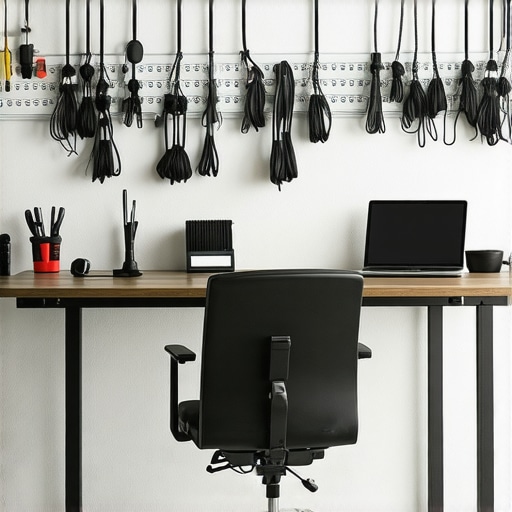
Lessons from the Trenches: Surprising Truths About Desk Organization
One of the most eye-opening lessons I learned is that surface clutter isn’t the real enemy—it’s the unseen chaos behind the scenes. Once I started using vertical dividers in my deep drawers, I realized that organization isn’t about adding more containers but about thoughtful placement. This insight saved me countless minutes and reduced those frustrating moments of rummaging through piles of cables and accessories.
Another revelation was how inconspicuous tweaks, like repositioning my monitor or adjusting the height of my standing desk, drastically improved my energy levels. Small adjustments often overlooked can make a significant difference, and they’re worth experimenting with before investing in expensive solutions.
Finally, I discovered that over-organization can backfire. Packing every inch with storage solutions can create more clutter and make your workspace look chaotic. The key is intentional minimalism: keep only what you use daily and store the rest out of sight. It’s about quality over quantity—an ethos I now apply to my entire setup.
My Gear Recommendations That Keep My Home Office Running Smoothly
First, investing in a quality ergonomic chair, like the one detailed in this guide, has been transformative in preventing tailbone pain. Pair it with an adjustable standing desk, which you can fine-tune according to this setup, and your energy stays consistent through long work hours.
For cable management, I rely on magnetic cable rails. These simple additions keep wires out of sight and prevent accidents, making my workspace safer and more organized.
Finally, I swear by vertical dividers for my drawers—they maximize space and ease access to frequently used items. These essential tools keep my home office functioning seamlessly day in, day out.
Your Turn to Transform Your Workspace Now
Remember, building an efficient and comfortable home office isn’t about the flashiest gadgets but about understanding how each piece contributes to your productivity and comfort. Start small—adjust that standing desk height, tidy up with vertical dividers, or hide those bulky power bricks—and observe the difference. Your perfect workspace is within reach if you’re willing to experiment and learn from your space.
What’s the one tweak you’re excited to try first? Share your plans below—I’d love to hear how you’re optimizing your home office setup!
